|
OCIE by Donnell Systems, Inc. |
|
Visualizing Information Using Report Extractions
and Microsoft Excel Templates |
|
|
|
OCIE Information Management, Delivered
as a Managed Service Donnell Systems, Inc. Publication Date: Thursday, June 4, 2026 |
|
Introduction With rising
operational costs and changing regulatory compliance needs, business leaders
are faced with increasing pressure to optimize their workflows to stay
relevant in highly competitive markets.
According to a recent edition of The CFO Survey conducted by Duke University s Fuqua
School of Business, one of the most comprehensive surveys of financial
decision makers, nearly sixty percent of companies have implemented software,
equipment, or technology to automate tasks that previously relied on manual
input from employees. Additionally,
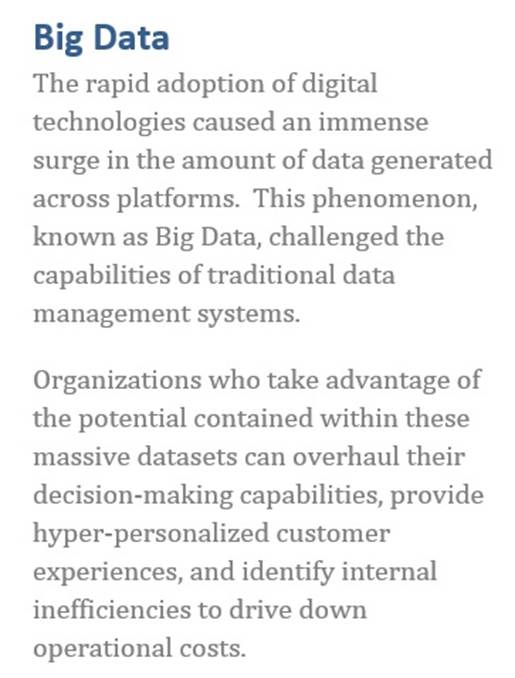
a systematic review of the impact Big Data has on small and
medium-sized enterprises (SMEs) conducted by the University of Johannesburg
revealed that while Big Data offers significant benefits to enterprises of
all sizes, SMEs struggle to fully leverage the potential of Big Data due to
limited financial, personnel, and IT resources. Without |
|
|
proper data
visualization methods, SMEs are failing to realize the true potential of
their data. The results are clear:
workflow and process automation along with solid data visualization practices
allow organizations to optimize how they utilize finite employee resources
while ensuring they remain in compliance with audit and regulatory needs. How an
organization chooses to go about implementing these workflow optimizations is
just as important as the numerous benefits they provide. Many industry-specific automation tools
exist but these tools are often rigid and complex, forcing companies to adapt
existing processes to fit within the tool s framework instead of adapting the
tool to fit the organization s needs.
Additionally, changes in regulations can leave organizations in limbo
as they wait for a third party to adjust their product to meet compliance
needs. This document
aims to inform the reader on the use of the OCIE
Information Management Suite to take greater command of their data and
how they utilize it. OCIE enables
organizations to create optimization and analytical solutions tailored to
their own needs, realizing the benefits of improved processes and decision
making without the headaches and unknowns presented by a one-size-fits-most
solution. |
|
|
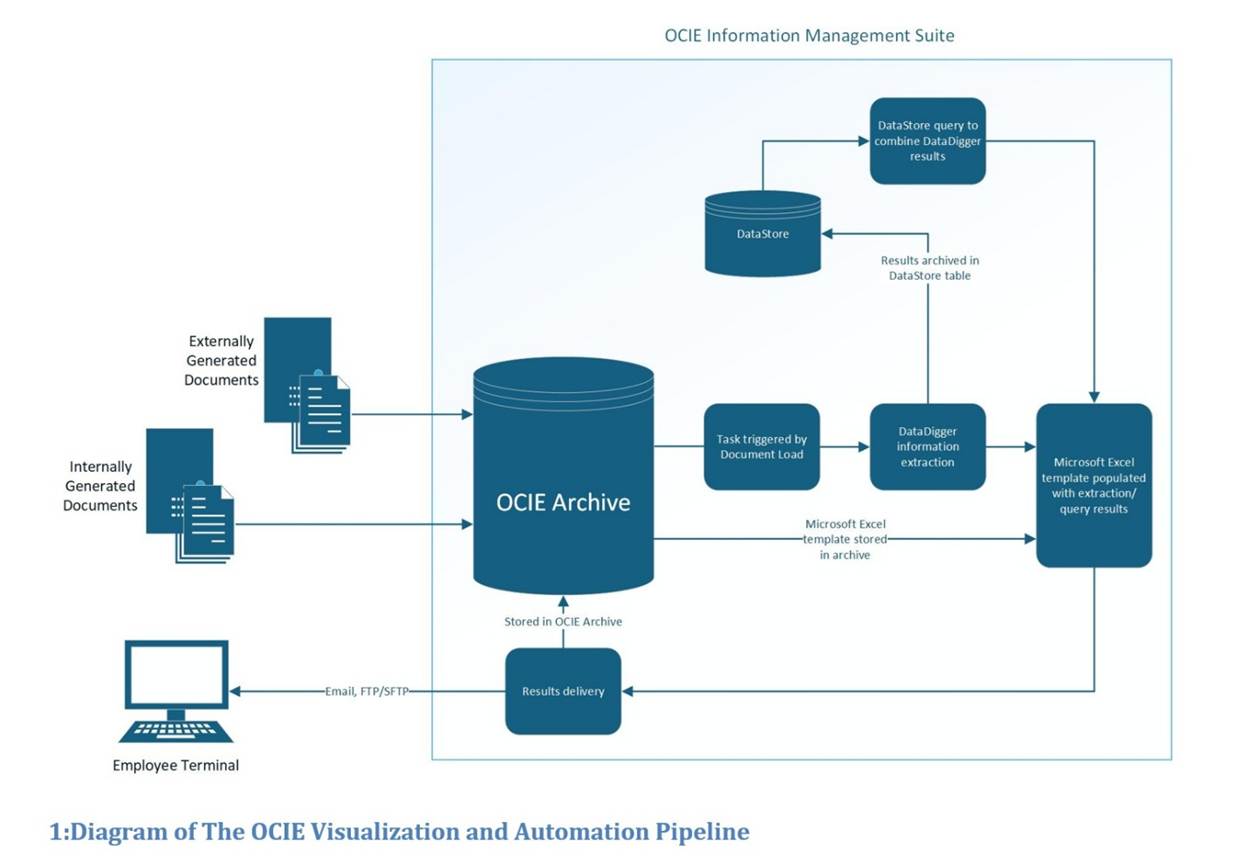
The OCIE
Visualization and Automation Pipeline OCIE allows
organizations to create robust optimization and data visualization
pipelines. OCIE accepts documents
generated by both internal and external reporting sources, providing a
centralized, authoritative, and auditable archive of
information. Once these documents
are loaded into OCIE they can be mined for essential
information via DataDigger, all while preserving the original
documents. The execution of these DataDiggers can be automated via Task Manager,
with a variety of trigger criteria to complement any process. The DataStore
can be utilized to accumulate information extracted with DataDiggers
into a database, which can be queried to export data from various documents
into customized Microsoft Excel templates. These templates provide streamlined access
to whatever information a business process may require along with the ability
to automatically input said information into visualization aids like charts
and graphs. Strong access control
protocols are in place throughout the entire pipeline, ensuring only
appropriate individuals can make changes to the underlying business logic
while also archiving any changes to produce a solid audit trail. |
|
|
|
Transform Overwhelming Data into Valuable Information with DataDigger |
|
|
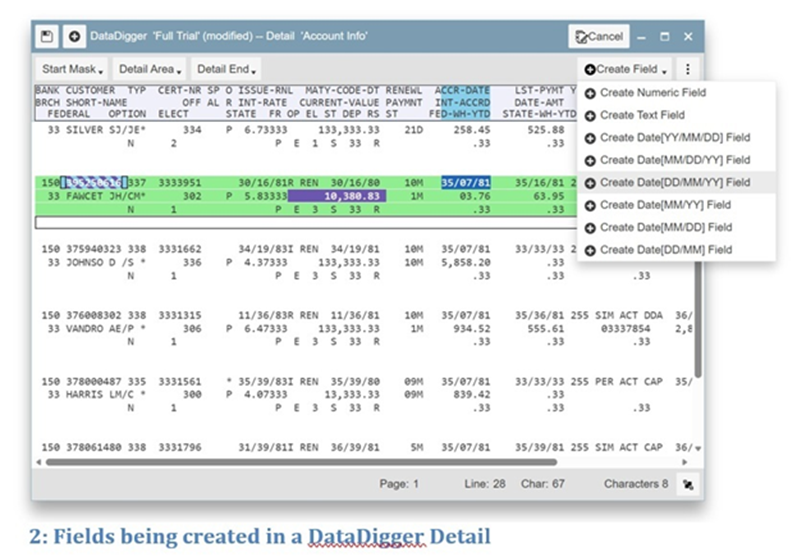
One of the key
features provided by OCIE is the ability to extract targeted data from
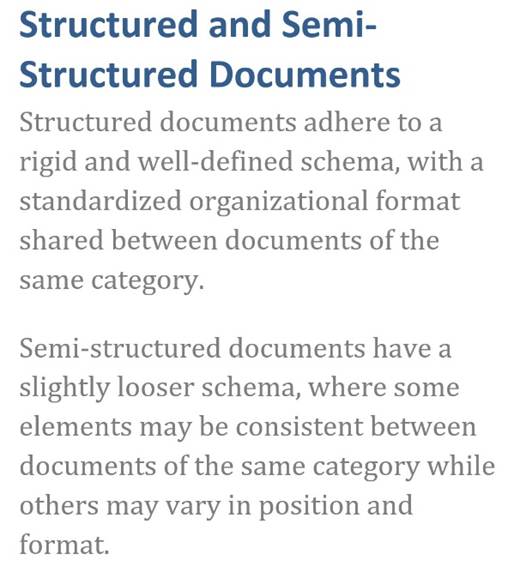
documents via DataDigger. DataDigger
allows organizations to define the details and fields they need from the
documents stored within OCIE and extract the required data from any
structured or semi-structured document with a matching schema: giving clients
easy access to the information they need, when they need it. DataDiggers
achieve this extraction without altering the document from which they are
querying the required information; they are simply filtering out the noise
and returning the necessary information. With comparable effort to manually searching through a
document for the |
|
|||||||
|
information they require, clients can create a DataDigger that will give them that information on demand for any documents of that type that have or will be generated. This eliminates manually searching for task specific information whenever a new day s document is loaded, improving efficiency while reducing human error. DataDiggers empower clients by automating their data acquisition and validation, allowing them to focus on more critical tasks. |
|
||||||||
|
DataDiggers turn document text into extracted data-types (text, numbers, dates) with a deterministic, repeatable methodology ensuring accurate results. Because DataDiggers do not alter the documents they operate on, organizations can rest assured that the integrity of their document archive and audit trail is maintained. The results produced by a DataDigger are compiled into a CSV file or custom Microsoft Excel template that can be stored within OCIE for archival purposes, emailed to relevant parties via Task Manager, or combined with other DataDigger results in the DataStore |
|
||||||||
|
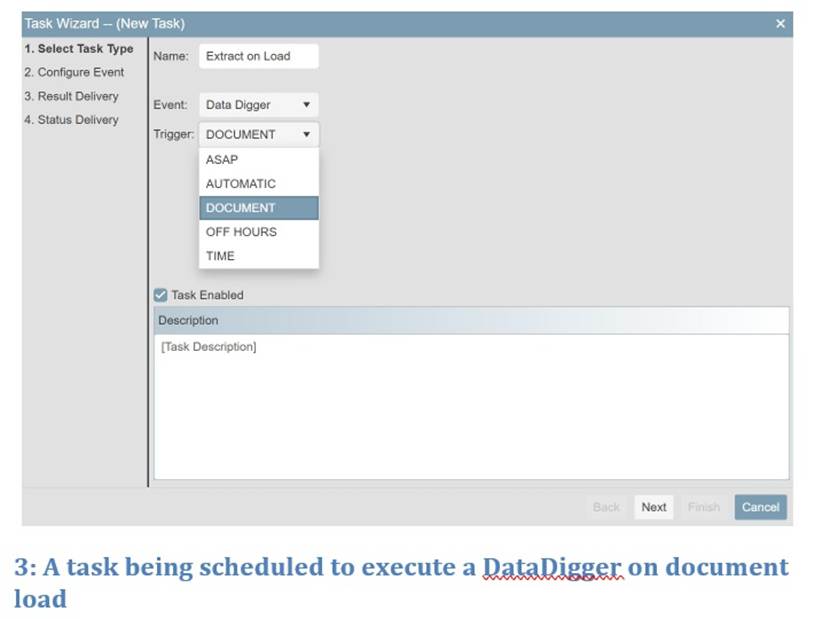
Automate
Data Extraction with Task Manager A crucial step in optimizing workflows
with OCIE is automating DataDigger execution with Task Manager. Task Manager is a powerful scheduling
module within OCIE that allows clients to create automated tasks based on events
and triggers. With Task Manager,
organizations can run DataDiggers on customized
time schedules, consistently during off hours, or as soon as a document
associated with the DataDigger is loaded into OCIE. Tasks can deliver their DataDigger
results to multiple clients within an organization directly via email, to an
SFTP location, or store them |
|
||||||||
|
within the
organization s OCIE Archive. This
makes the results available to tools and personnel soon after the underlying
documents are available. Task Manager has
varied levels of client access via privileges, allowing organizations to fine
tune which of their OCIE clients have access to creating and rescheduling
tasks. Each task features robust
process logging, providing a transparent record of the task s functions for
any auditorial and compliance requirements.
Task Manager allows organizations to streamline their workflows based
on their needs while ensuring their processes are still converting data into
validated information. |
|
|
|||||||
|
Compile
DataDigger Information with DataStore When a process
requires information from multiple documents, DataStore
is an essential tool to combine that information into a single source. DataStore
provides organizations with an interface that allows them to easily populate
an SQL database with data elements extracted via DataDiggers. The DataStore can
then be queried for the required DataDigger results, combining previously
separate extracts into a single CSV file ready for analysis. DataStore
queries can also be exported as custom Microsoft Excel templates, allowing
fields to be integrated into custom business logic, which enables near
endless workflow optimization possibilities. DataStore allows organizations to collect the
information they need from their data archive so it s ready the moment they
need it. When combined with Microsoft
Excel templates, DataStore provides a comparable
data collection benefit to more complex business intelligence solutions
without significant IT resource requirements.
With DataStore, organizations can easily
collect and archive their extracted information to streamline any number of
business processes. |
|
||||||||
|
Visualize
Extracted Information with Microsoft Excel Templates |
|
||||||||
|
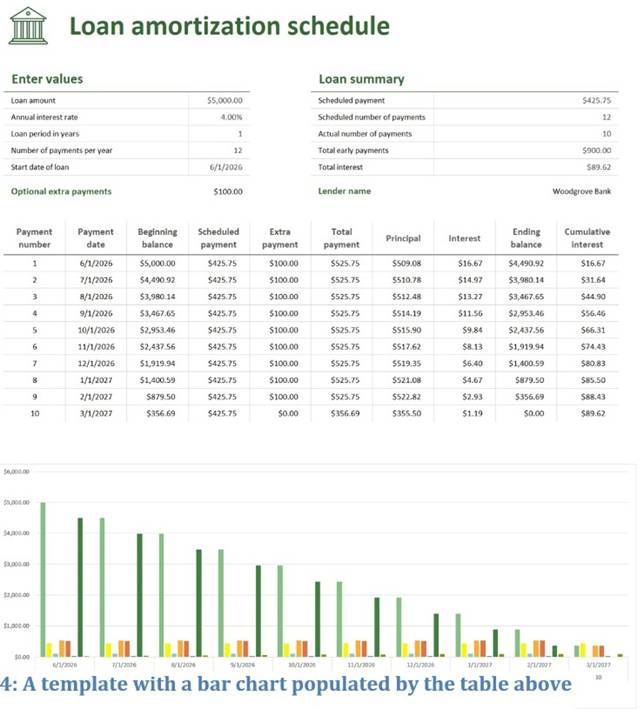
The benefits of DataDigger results and DataStore queries can be further amplified by integrating
them with custom Microsoft Excel templates.
Templates grant organizations the ability to define formatted
worksheets customized to fulfill whatever information requirements a business
process may have, eliminating the need to build workbooks from scratch. Templates provide consistent presentation
and ease of access to vital information.
While templates are beneficial on their own, manual data entry is
still an inevitability once they ve been integrated into an organization s
workflow. With OCIE, templates can be
stored within an organization s OCIE Archive, where they can be
auto-populated with information extracted by DataDiggers
or DataStore queries |
|
|
|||||||
|
Templates that utilize the information
extraction capabilities of OCIE have two primary components: an information
worksheet where the extracted information is stored, and a visualization
worksheet where the desired information is displayed and operated on. The information worksheet is created within
the template, where tabular data is populated by field values produced from
DataDigger or DataStore queries. These field values are then linked to
reference names to be used in the visualization worksheet. The reference names are placed in the
appropriate cells of the visualization worksheet, where they are replaced by
the extracted field values when the template is exported from OCIE. The reference names can be used directly,
or in part of a business logic formula to generate |
|
||||||||
|
|
whatever
synthesized information an organization may need. Templates can also be structured to
incorporate the imported information into graphical displays like charts and
graphs, enabling seamless data visualization capabilities. The result is a completed worksheet with
all the requisite information ready to go as soon as it s generated by OCIE. All templates integrated into the solution become immutable inside the OCIE Archive, providing an auditable history of the business logic contained within the template if changes need to be made. This ensures clients can rest easy knowing the template they re using is up to date and doing what they expect it to do, while also providing a record of the template for audit and compliance needs. |
|
||||||||
|
Application
of the OCIE Visualization and Automation Pipeline |
|
||||||
|
The Edit
Error Report Solution Rectifying
discrepancies between accounting and reporting data is a daily inevitability
of mortgage servicing. The onus is on
servicers to immediately respond to any inconsistencies they encounter in
order to ensure compliance under federal, state, and investor
guidelines. These discrepancies are
delivered through various reports that range from loan-level summaries to
portfolio-wide snapshots, resulting in a labor-intensive process that must be
performed every day. |
|
|
|||||
|
The
Edit Error Report Solution developed by Donnell Systems leverages the power
of OCIE to automate the process of addressing these discrepancies: removing
the need to manually check through each individual report while ensuring the
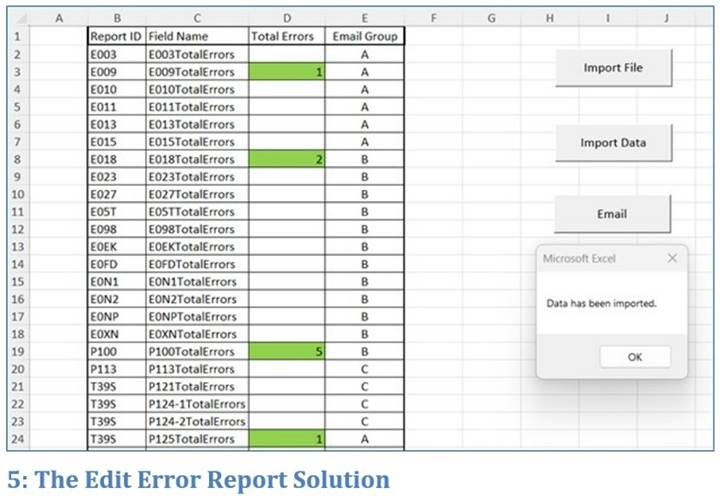
right people are notified if and when a problem must be addressed. As error reports are loaded into an
organization s OCIE Archive, DataDiggers extract
targeted error fields automatically via the Task Manager. The DataStore
combines the DataDigger results into an SQL table, ready to be queried by
management to export a Microsoft Excel workbook containing all the
information employees need to address the day s discrepancies. The template not only lists which reports
have errors that require immediate action, but also allows the organization
to automatically send emails through Microsoft Outlook notifying the
responsible parties that there are inconsistencies they need to address. A
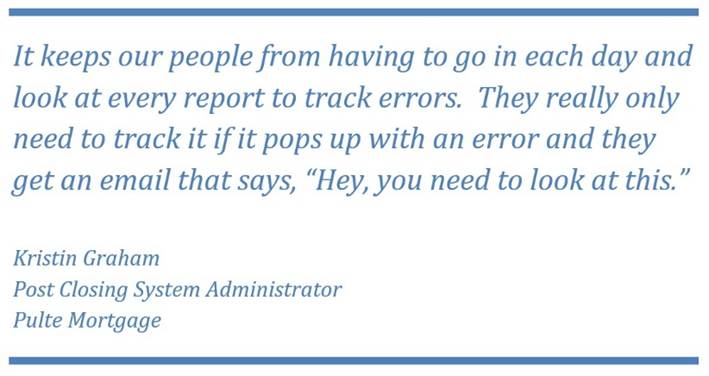
process that once required hours of skimming reports each day is now a task
that presents itself only when action is required: |
|
||||||
|
|
|
|||||
|
With the Edit Error Report Solution,
organizations are able to drastically reduce the labor footprint of a
necessary daily business process and deliver action items in a controlled
manner; enabling their employees to focus on more impactful tasks while maintaining
compliance with industry guidelines. |
|
||||||
|
The Daily
Cash Balancing Solution Daily
cash balancing is an incredibly time and resource heavy task faced by
mortgage servicers: information found on dozens of different reports must be
extracted and reconciled on a daily basis to ensure the servicer has an
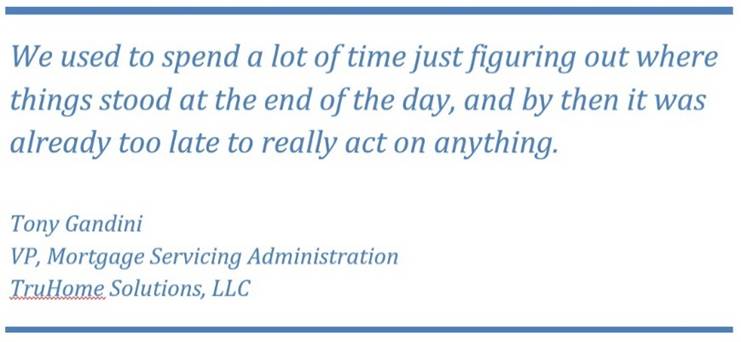
accurate snapshot of their financial standings. For many servicers, this process can be a
roadblock preventing them from making crucial, time sensitive decisions: |
|
||||||
|
|
|
|||||
|
The
Daily Cash Balancing Solution developed by Donnell Systems demonstrates the
workflow optimization possibilities enabled by OCIE. The requisite daily reports are stored in
the organization s OCIE Archive. These
reports are mined for the required data using purpose built DataDiggers, triggered via the Task Manager on document
load. The output of these DataDiggers is directed to a DataStore
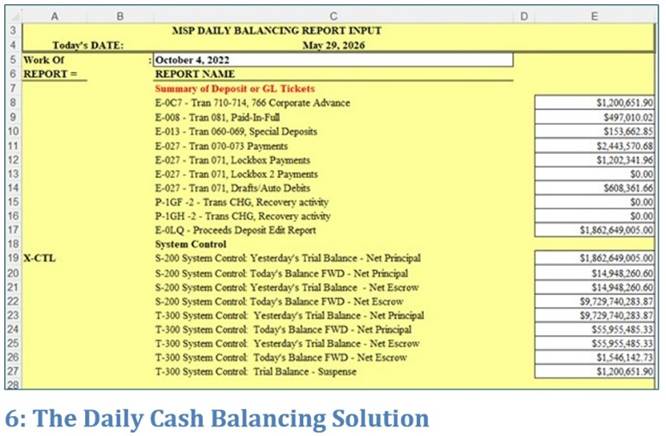
table to funnel the disparate results into a single location. All of the information the organization
needs to complete their balancing including values derived from business
logic contained within the template is now ready to be queried at the start
of the day, where it can be exported as a custom Microsoft Excel template to
auto-populate their daily cash balancing workbook. |
|
||||||
|
A necessary, but tedious daily task
reduced to a few clicks at the start of the workday. Since the template workbook can be modified
as needed, the Daily Cash Balancing Solution is adaptable to an
organization s unique needs, while providing a controlled process pipeline
within an unchangeable OCIE Archive.
When utilizing the Daily Cash Balancing Solution, organizations can
confidently say their daily balancing data comes from an authoritative
source, ensuring a proper auditing history is maintained and good business
decisions are made. |
|
||||||
|
Conclusion As competitive
pressure continues to build across markets and SMEs struggle to adapt to
staggering volumes of data, industry leaders are on an endless search to
optimize their operations for competitive advantage. If an organization wishes to thrive in this
ever-evolving landscape, they must seek out new ways to streamline and
automate their existing workflows while discovering new insights to better inform
key business decision makers. By utilizing the OCIE Information
Management Suite and custom Microsoft Excel templates, organizations have the
ability to transform previously labor-intensive processes into modernized
automated pipelines. OCIE provides its
customers with both an authoritative and auditable archive of their
information and cost-effective tools to achieve greater command of their
data. |
|
||||||